Every growing business reaches a point where spreadsheets, disconnected software, manual approvals, and scattered data begin to slow progress. Teams spend more time chasing information than making decisions. Finance struggles with reporting, operations lack visibility, inventory becomes difficult to track, and leadership finds it harder to scale with confidence.
This is where ERP (Enterprise Resource Planning) systems become essential. An ERP platform brings together key business functions such as finance, human resources, procurement, sales, customer management, manufacturing, and supply chain operations into one centralized system. It helps businesses streamline workflows, improve productivity, reduce duplication, and gain real-time insights.
But once the decision to adopt ERP is made, another major question appears: Should you choose a Cloud ERP system or an On-Premise ERP system?
This is not simply a technology choice. It is a strategic business decision that affects costs, agility, security, scalability, and long-term growth. While some organizations value the flexibility and lower upfront investment of cloud ERP, others prefer the control and customization offered by on-premise deployment.
Key Takeaways
- Cloud ERP offers faster deployment and lower upfront costs, making it ideal for growing and modern businesses.
- n-premise ERP provides greater control and deep customization, often preferred by enterprises with complex workflows.
- Cloud ERP usually works on subscription pricing, while on-premise ERP requires larger capital investment.
- Security depends more on implementation quality than deployment model alone. Both options can be secure when managed correctly.
- The best ERP choice depends on business priorities, including budget, scalability, IT resources, and long-term strategy.
Understanding ERP deployment models
Before selecting an ERP solution, it is important to understand how ERP deployment models work. A deployment model refers to the way your ERP software is installed, hosted, accessed, and managed. It directly affects cost, flexibility, maintenance, security, and scalability.
The two most common ERP deployment models are Cloud ERP and On-Premise ERP. Some businesses also choose a Hybrid ERP approach that combines both models. Choosing the right deployment model depends on your company’s size, budget, industry requirements, IT capabilities, and long-term growth plans.
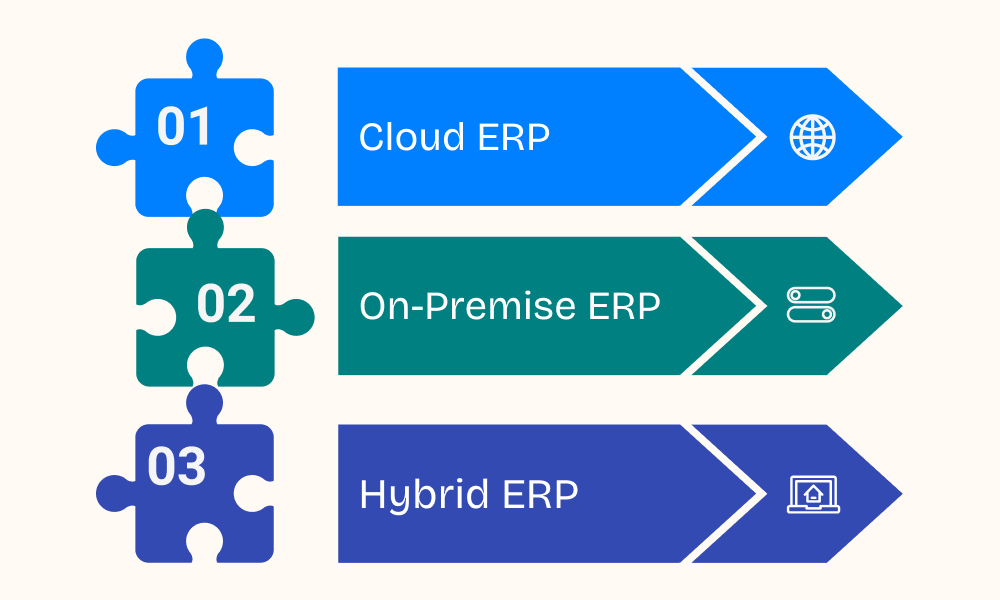
1. Cloud ERP
Cloud ERP is hosted on external servers managed by the software provider and accessed through the internet. Businesses usually pay a monthly or annual subscription fee instead of making a large upfront infrastructure investment.
Benefits of Cloud ERP:
- Lower initial setup cost
- Faster implementation
- Access from anywhere
- Automatic updates and maintenance
- Easy scalability as business grows
- Reduced dependency on in-house IT teams
Best For:
- Startups
- Small and mid-sized businesses
- Multi-location companies
- Businesses adopting remote work models
2. On-Premise ERP
On-premise ERP is installed on the company’s own servers and managed internally. The organization has full control over infrastructure, data storage, upgrades, and security systems.
Benefits of On-Premise ERP:
- Greater control over data and systems
- Deep customization capabilities
- Internal management of security policies
- Suitable for complex business workflows
- Long-term ownership advantages
Best For:
- Large enterprises
- Highly regulated industries
- Companies with dedicated IT teams
- Businesses needing advanced customization
3. Hybrid ERP
Hybrid ERP combines cloud and on-premise systems. For example, a company may keep sensitive financial data on-premise while using cloud applications for CRM, HR, or analytics.
Benefits of Hybrid ERP:
- Balance of control and flexibility
- Gradual digital transformation
- etter use of existing infrastructure
- Scalable modern capabilities
Best For:
- Enterprises transitioning from legacy systems
- Companies with mixed compliance needs
- Businesses wanting phased ERP modernization
Cloud vs On-Premises ERP
Choosing between cloud and on-premise ERP requires understanding the strengths and limitations of each model. While both can improve operations, their impact on cost, flexibility, speed, and control differs significantly.
Factor | Cloud ERP | On-Premise ERP |
|---|---|---|
Deployment Time | Faster | Slower |
Initial Cost | Lower | Higher |
Ongoing Cost | Subscription-based | Maintenance + IT costs |
Accessibility | Anywhere access | Usually internal/VPN access |
Scalability | Easy to expand | Requires hardware upgrades |
Updates | Automatic | Manual |
Customization | Moderate to high | Very high |
IT Dependency | Lower | High |
Security Management | Vendor-managed/shared | Internal team-managed |
Best For | SMBs, scaling companies | Large enterprises, complex needs |
Cloud vs On-premises ERP: Cost Analysis
When comparing Cloud ERP and On-Premises ERP, cost should be evaluated beyond the initial purchase price. Many businesses focus only on upfront expenses, but the real financial impact includes implementation, maintenance, upgrades, infrastructure, staffing, and long-term scalability. Understanding the total cost of ownership helps leaders make a smarter decision.
Cloud ERP typically follows a subscription-based pricing model, where businesses pay monthly or annually based on the number of users, modules, or usage levels. This reduces the need for heavy capital investment and makes budgeting easier. Since hosting, maintenance, updates, and security are often managed by the provider, internal IT costs may also be lower.
On-Premises ERP usually requires a larger upfront investment. Businesses need to purchase software licenses, servers, storage systems, networking hardware, and security tools. In addition, internal teams are responsible for system maintenance, upgrades, backups, and technical support. While recurring subscription costs may be lower or absent, operational expenses can increase over time.
Cost Factor | Cloud ERP | On-Premises ERP |
|---|---|---|
Initial Investment | Low to Medium | High |
Software Licensing | Subscription-based | One-time or perpetual license |
Hardware Costs | Minimal or none | High |
Implementation Cost | Moderate | High |
Maintenance | Included or lower | Higher internal cost |
Upgrade Costs | Usually included | Separate project cost |
IT Staffing Need | Low to Moderate | High |
Scalability Cost | Flexible pay-as-you-grow | Requires new infrastructure |
Predictable Budgeting | High | Moderate |
Long-Term Ownership Cost | Ongoing recurring cost | Higher upfront, variable later |
Cloud vs On-premises ERP: Strategic Business Consideration
Choosing between Cloud ERP and On-Premises ERP is not only a technical decision—it is a strategic business move that can influence efficiency, growth, customer experience, and long-term competitiveness. While both models help streamline operations and centralize business data, the right choice depends on how well the system supports your organization’s goals, structure, and future plans.
Cloud ERP is often preferred by businesses seeking speed, flexibility, and scalability. It enables faster deployment, remote accessibility, easier updates, and lower dependence on internal IT teams. This makes it ideal for companies planning expansion, supporting hybrid workforces, or adapting quickly to changing market demands.
On-Premises ERP, on the other hand, offers greater control over infrastructure, data management, and customization. It is often chosen by organizations with highly complex operations, strict compliance requirements, or existing IT investments. Businesses that require custom workflows or deeper system ownership may find this model more suitable.
Business Factor | Cloud ERP | On-Premises ERP |
|---|---|---|
Scalability | Easy to expand users and modules | Expansion may require new hardware |
Deployment Speed | Faster implementation | Longer setup timeline |
Remote Access | Excellent for distributed teams | Limited without VPN or custom access |
IT Dependency | Lower internal IT burden | High internal IT involvement |
Customization | Moderate to high | Very high |
Security Control | Shared/vendor-managed | Full internal control |
Compliance Needs | Suitable with right vendor | Strong for custom regulatory environments |
Business Agility | High | Moderate |
Infrastructure Ownership | Vendor-managed | Company-owned |
Long-Term Flexibility | Strong for growth-focused firms | Strong for complex enterprises |
Conclusion
Cloud ERP is ideal for businesses seeking flexibility, faster deployment, lower upfront costs, and seamless scalability. It empowers organizations to adapt quickly, support remote teams, and stay competitive in a rapidly evolving market. On-Premises ERP, on the other hand, remains a strong choice for enterprises that require deeper customization, complete infrastructure control, and specialized compliance management.
At jiWebTech, we understand that every business has unique challenges and long-term goals. That is why we help organizations evaluate their needs, compare ERP deployment models, and implement tailored ERP solutions that drive measurable results. Our focus is not just on technology adoption, but on creating systems that improve efficiency, enhance decision-making, and support sustainable growth.
Whether you are modernizing legacy systems or planning a new ERP investment, partnering with the right technology expert can make all the difference. With jiWebTech, businesses gain the strategic guidance and technical expertise needed to build a smarter, future-ready enterprise. Contact us to learn more.
Frequently Asked Questions
1. What is the main difference between Cloud ERP and On-Premises ERP?
The primary difference lies in where the software is hosted and how it is managed. Cloud ERP is hosted on remote servers by the provider and accessed through the internet, while On-Premises ERP is installed on the company’s own servers and managed internally.
Key Points:
- Cloud ERP is web-based and remotely hosted
- On-Premises ERP is installed locally
- Cloud ERP requires lower infrastructure investment
- On-Premises ERP offers greater internal control
2. Which ERP solution is better for small and growing businesses?
Cloud ERP is often the preferred option for startups, small businesses, and growing companies because it offers lower upfront costs, faster implementation, and easier scalability.
Key Points:
- Lower initial investment
- Subscription-based pricing model
- Easy to add users and modules
- Faster deployment process
- Reduced need for in-house IT staff
3. Is Cloud ERP secure for business operations?
Yes, modern Cloud ERP systems can be highly secure when provided by trusted vendors. Many cloud providers invest heavily in security technologies, data encryption, regular updates, and backup systems.
Key Points:
- Advanced encryption standards
- Automatic security updates
- Multi-factor authentication options
- Regular backups and disaster recovery
- Secure access controls
4. Why do some businesses still choose On-Premises ERP?
Many organizations choose On-Premises ERP because it offers complete control over data, infrastructure, customization, and internal security policies. It is especially useful for businesses with complex operations or strict regulatory requirements.
Key Points:
- Full ownership of infrastructure
- Greater customization flexibility
- Internal control over upgrades
- Suitable for complex enterprise workflows
- Strong fit for regulated industries
5. Which ERP model is more cost-effective in the long run?
The answer depends on business size, growth plans, and internal resources. Cloud ERP can be more cost-effective for businesses seeking predictable monthly expenses, while On-Premises ERP may benefit companies with existing infrastructure and large IT teams.
Key Points:
- Cloud ERP lowers upfront costs
- Subscription fees continue over time
- On-Premises has higher initial investment
- Existing infrastructure can reduce long-term costs
- Total cost depends on usage and scale
6. Can ERP systems support remote and hybrid work environments?
Yes, both ERP models can support remote work, but Cloud ERP usually provides easier and more efficient access for distributed teams through web browsers and mobile apps.
Key Points:
- Cloud ERP enables anytime access
- Supports hybrid and remote teams
- Mobile-friendly interfaces available
- On-Premises may require VPN access
- Better collaboration across locations
7. How can jiWebTech help businesses choose the right ERP solution?
jiWebTech helps businesses evaluate their operational needs, compare ERP deployment models, and implement customized ERP solutions that align with growth goals and budget requirements.
Key Points:
- ERP consulting and strategy planning
- Cloud and On-Premises ERP guidance
- Custom ERP development services
- Integration with existing systems
- Ongoing maintenance and support
- Scalable solutions for future growth